PhotoShare Frame v2
- 4.8
- Rating
- 100.00K
- Installs
- Free
- Price

 Analysis by App-foxy
I found PhotoShare Frame v2 most useful when I treated it as a focused companion for a dedicated digital picture frame rather than as a general photo-management app. Its job is simple: send pictures to a PhotoShare Frame. That narrow purpose is also its main strength. I do not have to sort through a social feed, edit images in a full photo suite, or learn a complicated smart-home dashboard before sharing a family photo.
The app sits in the House & Home category and comes from SimplySmart Home by Switchmate. It is free to install, suitable for Everyone, and has built a 4.8 average from around 3.8 thousand ratings, with more than 100 thousand installs. Those figures suggest a healthy level of adoption, but I still think the important question is whether its limited role matches the way you want to display photos at home.
What using PhotoShare Frame v2 feels like in everyday life
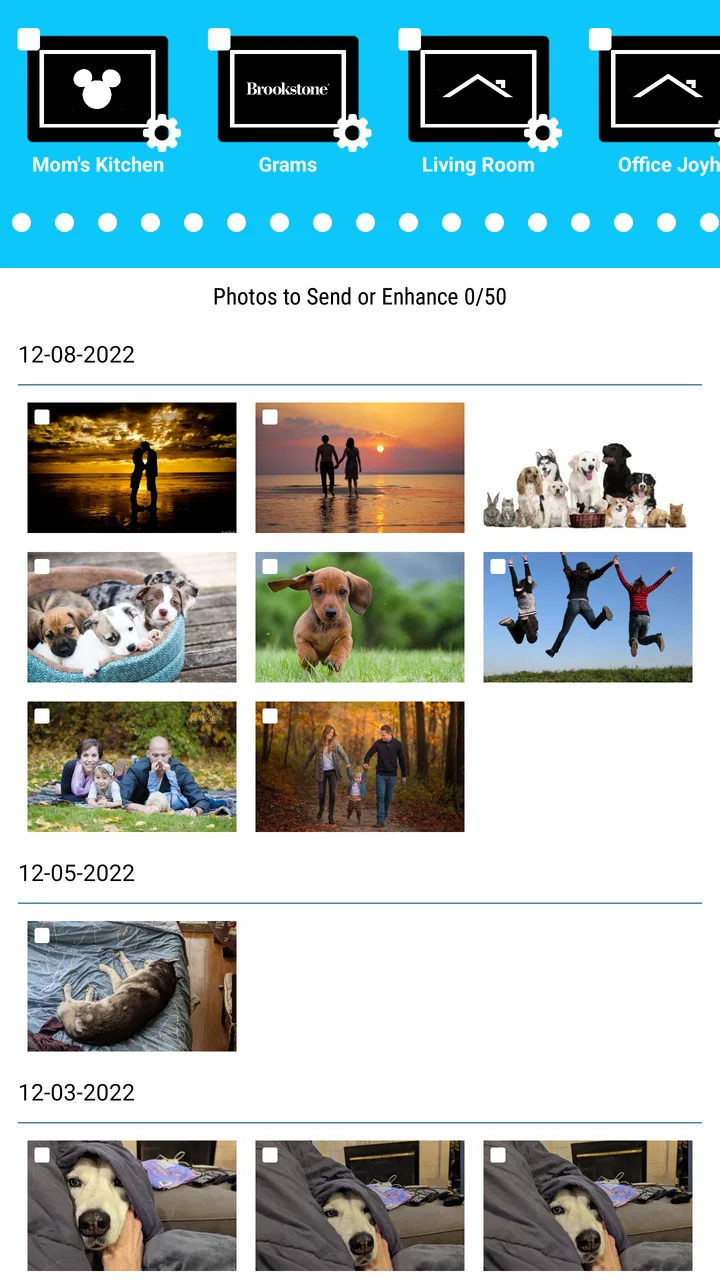
My first impression is that this is a utility built around a physical object. The phone is the place where I choose the image, while the frame is where the result matters. That distinction helps set expectations: the app is not trying to replace Google Photos, Apple Photos, a cloud album, or a messaging service. It is the bridge between a personal photo library and a PhotoShare Frame.
You May Also Like

 Blood Strike: 2.5 Anniversary
Blood Strike’s Loadouts Turn Every Drop Into a Tactical Gamble
A close look at Blood Strike’s custom loadouts: how fast access to signature weapons reshapes its battle royale rhythm, rewards preparation, and narrows the gap between fights.

 Pandora - Music & Podcasts
Pandora’s Music Is Easy to Start, but Harder to Recover
Pandora’s strength is its low-effort path from a seed to a station. Its weak spot is how much confidence it asks you to place in connection, setup, and quiet recovery.

 8 Ball Pool
 Is Built on Rivalries, Rematches, and Routine
A close look at the rivalries, rematches, shared routines, and unanswered safety questions that turn a quick pool match into a persistent mobile community.

 Samsung Music
’s Quiet Strength Is Playing What You Already Own
Its reach comes less from spectacle than from dependable access to a personal library. That simplicity is both the app’s strongest retention engine and its ceiling.

 AccuWeather: Weather Radar
AccuWeather Review: A Quick, Clear Forecast for Everyday Decisions
For everyday plans, the best forecast is the one you can understand quickly. AccuWeather makes rain timing, radar, and local conditions easy to act on, with a few trade-offs.

 Hill Climb Racing
Why Hill Climb Racing Still Turns Crashes Into One More Run
A tiny car, a bumpy hill and one more upgrade: Hill Climb Racing keeps resurfacing because its simple chaos makes every near-miss feel personal.
More From Our News Desk



A realistic example is a family member who keeps a frame in the living room. Instead of visiting the house to update it, I can use the app to send a recent picture for the display. The same workflow makes sense for grandparents, a child’s room, a home office, or a shared household space where people want changing pictures without handling a memory card every time.
I also like the emotional simplicity of that arrangement. A frame can become a quiet, visible part of a room, while the phone remains private. I can decide which image belongs on the display instead of exposing my whole camera roll. That separation is especially helpful when several people contribute photos but only selected images should appear in a common space.
The current version is 4.0.15, and the app supports devices running Android 5.1 or later. That broad compatibility is useful if the phone used for managing the frame is older or is kept as a shared household device. On the other hand, compatibility alone does not make the experience equally comfortable on every phone. A small, aging handset may make browsing and selecting images feel less pleasant than a modern device.
The app works best when the frame has a clear purpose
I would recommend deciding what the frame is for before filling it. A frame used for family memories benefits from occasional, intentional updates. One used as a rotating household display may need contributions from more than one person. Thinking about that beforehand prevents the app from becoming a dumping ground for random camera-roll images.
One practical habit is to prepare a small selection in the phone’s normal photo app first. I can remove screenshots, near-duplicates, blurry shots, and private images before opening the frame app. This is more efficient than searching through everything while I am already in the sending workflow, and it reduces the chance of choosing the wrong picture in a hurry.
Another useful approach is to choose images for the physical display, not just images that look good on a phone. A portrait with important details near the edges may feel cramped after the frame presents it. A group picture with clear faces and a simple background is often a safer choice. The app’s purpose makes this visual judgment more important than advanced editing tools would be in a general photo service.
Trust starts with a narrow job, not a long feature list
For me, the clearest trust signal is the limited task. I open the app to send a photo to a particular kind of home device, rather than to publish content publicly or interact with an advertising-heavy social network. That does not answer every privacy question, but it makes the user choice easier to understand: select an image, send it to the frame, and decide what belongs in the room.
I would still review the permission prompts shown on my own device instead of approving everything automatically. Android can present permissions differently depending on the operating-system version and the phone manufacturer. If the app asks for access to photos, I would choose the narrowest option that still lets me select the images I want. If a permission does not seem connected to sending photos to the frame, I would pause and examine the explanation before continuing.
That is not unnecessary caution. A photo can contain more than the subject I intended to share. Background details may reveal a home layout, a child’s school information, a location clue, or another person who did not expect the image to be displayed. The app may make sending easy, but I remain responsible for checking the image and destination.
I also avoid using a shared phone account casually. If several people manage the same frame, it is worth agreeing on who can send pictures and what kinds of images are appropriate. The app’s usefulness depends on the physical frame being in a trusted household space. A simple conversation can prevent an awkward image from appearing in front of visitors.
Where user control matters most
The most important control is the decision about what leaves the phone. I do not think of the app as a passive mirror of my gallery. I treat every send action as a deliberate publication to a screen that other people may see. That mindset is more reliable than assuming the frame is private simply because it sits inside a home.
I would also check the recipient or frame selection carefully before confirming a send, particularly if the household has more than one compatible frame. A photo intended for a bedroom display should not accidentally appear in a shared living area. Even when the interface is straightforward, destination mistakes are the kind of small error that can matter more than a missing advanced feature.
For recurring use, I would create a simple personal routine: select the pictures in advance, inspect each one at full size, confirm the intended frame, then send only the final group. This adds a few seconds, but it gives me a clear review point before the image becomes visible on another device.
There is also a useful distinction between convenience and control. A dedicated frame app can be easier than emailing photos or moving them through a USB drive, but convenience may encourage impulsive sharing. The best experience comes from using the speed for planned updates, not from sending every image immediately after taking it.
How it compares with the usual alternatives
The nearest alternative is often a cloud photo album. Albums are better when several people need to browse, comment on, search, and organize a large collection across phones. They are also more flexible for editing and long-term storage. PhotoShare Frame v2 is more focused: its value appears when the final destination is a physical PhotoShare Frame and the goal is visible display rather than broad photo management.
Email can work for an occasional transfer, but it adds an inbox, attachments, and a less direct path between the sender and the frame. A USB drive gives more manual control, yet it requires physical access and a compatible transfer process. The dedicated app is more convenient for remote updates, especially when the frame belongs to someone who is not comfortable handling storage devices.
Messaging apps are convenient for family groups, but they mix the photo with conversation and may compress or bury it among other messages. A frame-specific workflow keeps the action tied to the display. That is a genuine advantage for a household tradition, such as adding a few new family pictures each week.
On the other hand, I would choose a full photo service if I wanted robust albums, advanced search, editing, automatic backup, or a single library shared across many kinds of devices. I would also hesitate to choose this app for a person who does not own a PhotoShare Frame. Its focused design is not a disadvantage in the right setup, but it gives little reason to install it without the matching hardware.
Privacy-sensitive moments deserve extra attention
Photos taken at home often carry hidden information. A casual kitchen picture can show an address label, a calendar, a prescription, a child’s drawing with a name, or a computer screen in the background. Before sending an image, I look beyond the main subject and check the corners. This is one of the most valuable habits for anyone using a digital frame in a shared room.
I am also careful with images involving children, guests, and other people’s personal situations. A family member may be happy to receive a picture privately but not want it displayed where visitors can see it. If I am unsure, I ask first or choose a different image. The app makes transmission convenient, but consent still belongs to the people in the photo.
Location is another consideration. Even without a visible address, travel photos can reveal that a household is away. I would avoid treating the frame as a live travel diary if the display can be seen through a window or by visitors. A delayed selection of vacation pictures is often a better balance between sharing memories and revealing routines.
When I finish using the app, I keep the phone protected with the device’s normal lock and avoid handing an unlocked phone to someone merely so they can update the frame. If another person needs regular access, I would decide whether that arrangement is appropriate on the phone itself rather than assuming the app alone can separate every user’s responsibilities.
Small frictions that affect the experience
The app’s simplicity can become limiting if I expect it to behave like a complete photo editor. I would prepare cropping, rotation, brightness, and other adjustments in the phone’s regular gallery when necessary. That two-step process is not difficult, but it means the best results depend partly on tools outside the frame app.
Selection can also become tedious when the phone contains years of pictures. The more crowded the gallery, the more valuable it is to create a temporary album or shortlist before sending. This is not an exciting feature, but it changes the experience from searching randomly to working from a deliberate queue.
Another trade-off is that a dedicated frame workflow may feel excessive for someone who updates a display only once or twice a year. In that situation, manual transfer or a general cloud album may be enough. The app makes the most sense when the frame is an active part of the home and photos are refreshed often enough for remote sending to save real effort.
I would also avoid promising myself that a free app automatically means a completely frictionless setup. The software may be free to install, but the overall experience depends on the compatible frame, the home network, the phone’s photo access settings, and the person receiving the images. The app is one part of a small system, not the entire system by itself.
Who should use it, and who should skip it
I think it is a strong fit for someone who already owns a PhotoShare Frame and wants an uncomplicated way to keep it current. It is particularly suitable for families sharing selected memories with relatives, for households that want a changing display without plugging in storage, and for people who prefer a physical screen over another phone-based album.
It can also work well for a less technical recipient. The person receiving the frame does not necessarily need to manage the whole photo library if another family member handles updates. That division of responsibility can turn the frame into a thoughtful ongoing gift rather than a device that is exciting for a week and then forgotten.
I would skip it if my main goal were photo backup, editing, social sharing, or cross-platform organization. I would also skip it if I do not have the matching PhotoShare hardware, since the app’s purpose is tightly connected to that display. People who want extensive control over albums, permissions, or multiple device types may feel more at home with a broader photo platform.
For cautious users, the decision comes down to whether the visible benefit outweighs the need for careful selection. I am comfortable recommending it when the frame stays in a trusted space and the sender checks each image. I am less enthusiastic about using it casually in a public-facing room or with a large group where nobody is sure who can update the display.
My verdict after looking at control and convenience together
PhotoShare Frame v2 is best understood as a deliberate sharing tool for a dedicated home display. I like that its purpose is easy to explain and that it avoids pretending to be a complete photo ecosystem. The free app from SimplySmart Home by Switchmate has a clear audience, and its strong average rating and growing install base make it a credible choice for owners of the corresponding frame.
My recommendation comes with one condition: use the app with the same care you would use when placing a printed photograph in a shared room. Preview the image, inspect its background, confirm the destination, and think about who may see it. Those steps protect privacy more effectively than relying on convenience alone.
In the end, I would recommend it to a friend who wants to keep a family frame fresh from a phone, especially when remote updates are more practical than USB transfers or email. I would point that friend toward a general photo service instead if they need albums, backup, editing, or broad sharing controls. Within its narrower role, however, this app is sensible, approachable, and useful when the physical frame is genuinely part of the household routine.
FAQs for PhotoShare Frame v2
01What is PhotoShare Frame v2 and how does it work?
PhotoShare Frame v2 is a digital photo frame app designed to help users easily display and share their favorite photos. After installing the app, you can upload images directly from your smartphone or sync with various online photo services. The app supports multiple frame styles and slideshow options, enhancing the photo-sharing experience.
02Can I use PhotoShare Frame v2 to share photos with friends and family remotely?
Yes, PhotoShare Frame v2 allows you to share photos with friends and family, no matter where they are. You can invite others to connect to your frame via the app, enabling them to send photos directly. The app supports multiple users, making it easy to receive cherished moments from loved ones.
03What types of photo formats does PhotoShare Frame v2 support?
PhotoShare Frame v2 supports a wide range of photo formats, including JPEG, PNG, and BMP. This ensures users can upload almost any image without needing to convert files. The app also provides options to adjust resolution and orientation, ensuring photos are displayed beautifully on the digital frame.
04Does PhotoShare Frame v2 require a constant internet connection?
While an internet connection is required to initially set up the app and for photo sharing, PhotoShare Frame v2 can function offline. Once photos are downloaded to the frame, they can be viewed without an active connection. However, reconnecting to the internet allows for updates and new photo uploads.
05Is PhotoShare Frame v2 compatible with both Android and iOS devices?
Yes, PhotoShare Frame v2 is available for both Android and iOS platforms. Users can easily download the app from the Google Play Store or Apple App Store. The app offers a consistent experience across devices, ensuring seamless photo sharing and viewing regardless of your operating system.
Pros
- User-friendly interface for easy navigation.
- Supports multiple photo formats seamlessly.
- Real-time photo sharing with friends.
- Customizable slideshow options available.
- Secure cloud storage ensures privacy.
Cons
- Limited editing tools for photos.
- Requires a stable internet connection.
- Subscription needed for premium features.
- Occasional sync delays reported by users.
- No offline mode for viewing photos.

PhotoShare Frame v2
Gallery